.png)


.png)
.png)

Many SMEs become interested in Customer Data when simple questions become difficult to answer:
“Which customers came back?”
“Which Channel brings better customers?”
“Who buys only during Promotions?”
“Did Returning Customers actually increase this month?”
At that point, the business may assume it needs to purchase a CRM.
But expensive software does not automatically solve an unclear data structure.
If the business does not know which information matters, cannot consistently identify the same customer across transactions or allows each team member to record information differently, a CRM can simply become a more expensive database full of inconsistent data.
A better starting point for SMEs is to define a Customer Data Minimum that supports important decisions, then choose technology that matches the current level of complexity.
Start with Customer Data that supports decisions, not with buying software
CRM is a tool for managing Customer Relationships and Customer Data, but it is not a mandatory starting point for every SME.
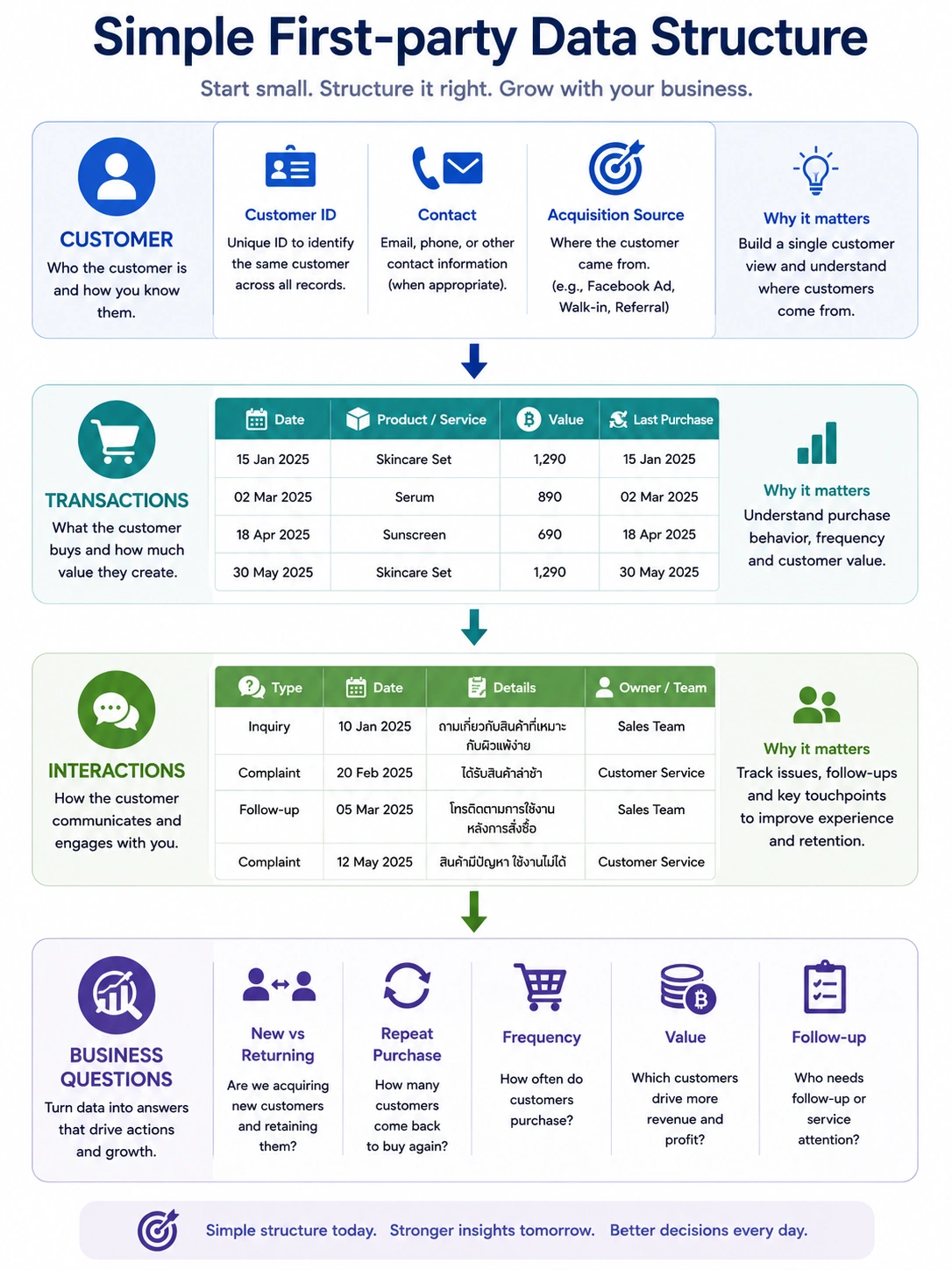
A small business can begin with a Spreadsheet or existing systems and collect essential information such as:
• Customer ID
• Contact Information where necessary
• Acquisition Source
• Purchase Date
• Product or Service purchased
• Transaction Value
• Last Purchase
• Key Interactions or Follow-ups
Each Field should have a reason for existing. Do not collect data simply because it might become useful someday.
HubSpot provides CRM Spreadsheet templates for Excel and Google Sheets and describes them as a way to begin tracking Contacts, Organizations, Opportunities and Interactions before moving to dedicated CRM software when Automation, Reporting and Team Collaboration become more complex.
For businesses operating in Thailand, identifiable Customer Data may also fall within the scope of the PDPA. Businesses should therefore consider the purpose of collection and use, the appropriate processing basis, retention, data subject rights and other privacy requirements from the beginning.
Start with Business Questions, not a list of Fields
Before building a Customer Database, ask what the business needs to know within the next 3–6 months.
For example:
- Which Channels produce New Customers?
- Which customers have not made a Second Purchase?
- Which customers purchase most frequently?
- Who buys only during Promotions?
- Which customer groups have higher Average Order Value?
- Which Sales Leads still require Follow-up?
Once the Business Question is clear, the required data becomes easier to identify.
If the question is: “Do customers come back?”
the minimum data may simply be: Customer ID + Purchase Date + Transaction
There is no need to begin with 50 Fields.
First-party Data comes from the business's direct relationship with customers
In a business context, First-party Data is information collected through direct interactions with Customers or Prospects.
Examples include:
- Information submitted through Forms
- Email or Phone provided directly to the business
- Purchase History
- Website or App Interactions collected through the business's own customer relationship
- Customer Service Interactions
- Loyalty Activity
- Survey Responses
Google gives examples of First-party Customer Data such as Email, Name, Address and Phone Number received when a customer completes a Conversion.
However, “First-party” does not mean “unrestricted.” When the information is Personal Data, the business still needs an appropriate Purpose and lawful processing approach under applicable privacy requirements.
For an SME, start with a Customer Data Minimum
The first database does not need to be complicated.
A practical minimum can be grouped into four areas.
Customer Identity
- Customer ID
- Name where necessary
- Contact Channel where necessary
Acquisition
- First Contact Date
- Acquisition Source
- Campaign or Referral Source where relevant
Transaction
- Purchase Date
- Product / Service
- Quantity
- Transaction Value
Relationship
- Last Contact
- Last Purchase
- Follow-up Status
- Issue / Interaction Category
Not every SME needs every Field.
For each data point, ask: “Which decision will this information help us make?”
Customer ID is more important than many businesses realize
Suppose the same person appears as:
Somchai
Somchai P.
081xxxxxxx
somchai@email.com
สมชาย
The database may count five Customers instead of one.
That can distort:
Customer Count
Repeat Purchase
Average Spend
Retention
Segmentation
Even in a Spreadsheet, define a Unique Customer ID or a consistent customer-matching rule.
For example:
C000001
C000002
C000003
Every Transaction should then connect back to the same Customer ID.
Do not force everything into one Spreadsheet tab
As the data grows, a single sheet containing Customers, Transactions and Notes creates unnecessary duplication.
A cleaner structure can use three simple tables.
- Customers
One row per Customer
Customer ID
Name
Contact
Acquisition Source
First Purchase Date - Transactions
One row per Transaction
Transaction ID
Customer ID
Date
Product
Value - Interactions
One row per meaningful Interaction
Customer ID
Date
Interaction Type
Owner
Next Action
This follows the same basic logic used in CRM databases that organize information through Objects, Records and Properties representing business relationships and processes.
A Spreadsheet can be enough while the workflow remains simple
Excel or Google Sheets may be sufficient when:
- Customer or Lead volume is still manageable manually
- Few team members edit the data
- Follow-up processes are simple
- Automation is not yet critical
- Reporting can be handled with Formulas or Pivot Tables
- Version control and Data Entry remain manageable
HubSpot explicitly offers Spreadsheet-based CRM templates for businesses not yet ready for dedicated software, including tracking Contacts, Companies, Opportunities and Interactions.
The relevant question is not: “Does a Spreadsheet look professional enough?”
It is: “Can this system still support the workflow without important data being lost or becoming unreliable?”
Start with five Customer Metrics your data should be able to answer
With a basic Customer ID and Transaction History, an SME should be able to calculate at least:
1. New Customers
How many customers purchased for the first time?
2. Returning Customers
How many previous customers returned?
3. Purchase Frequency
How often does each customer purchase?
4. Average Order Value
What is the average value per Transaction?
5. Recency
When did each customer last purchase?
These simple measures already allow the business to identify:
High-frequency Customers
Lapsed Customers
New Customers without a Second Purchase
Behavioral Customer Segments
You do not need Advanced AI or an enterprise CRM to begin Customer Analytics.
Standardize Field Definitions before the data becomes large
Suppose Acquisition Source contains:
Facebook
FB
Meta
Facebook Ads
Social
If all five mean the same Channel, reporting becomes unnecessarily difficult.
Create a simple Data Dictionary.
Field: Acquisition Source
Allowed Values:
- Facebook Ads
- Google Ads
- Organic Search
- Walk-in
- Referral
- Marketplace
- Other
Field: Customer Status
Allowed Values:
- New
- Active
- Lapsed
But these labels also require definitions.
For example: Lapsed = No Transaction for 90 days
The correct timeframe should reflect the business's Natural Purchase Cycle rather than an arbitrary universal benchmark.
Customer Data loses value when it is not updated
A CRM or Spreadsheet is only useful when the information remains current.
For example:
Transactions should be recorded after they occur
Lead Status should change after Follow-up
Contact details should be corrected when new information is received
Duplicates should be resolved
HubSpot recommends updating CRM Spreadsheet records after customer interactions rather than allowing updates to accumulate for later manual clean-up.
For SMEs, define:
Who creates the data?
Who updates it?
When should it be updated?
Which Fields are mandatory?
Who checks Data Quality?
A low-cost tool with clear ownership can be more useful than expensive software with no consistent workflow.
Do not collect information simply because “we might use it someday”
A Customer Database does not need to know everything about every customer.
Before collecting Fields such as:
Birthday
Occupation
Income
Marital Status
Household Size
ask what decision they support.
More data does not automatically create more Insight.
And when the information can identify a person, unnecessary collection can increase Privacy, Security and Data Management obligations.
PDPC materials demonstrate the importance of defining data categories, purposes, processing bases, retention periods and data subject rights as part of personal data management.
Build PDPA considerations into Customer Data from the beginning
For an SME operating in Thailand, Customer Data can include Personal Data such as:
Name
Phone
Email
Address
Customer IDs that can be linked to individuals
Purchase History linked to a person
Interaction History
At minimum, the business should understand:
- What data is collected
- Why it is collected
- The relevant processing basis
- Who can access it
- How long it is retained
- Who receives or processes it
- How customers can exercise applicable rights
GPPC's Privacy Policy illustrates how Purpose, Data Categories, Processing Basis, Retention and Data Subject Rights can be documented, while GPPC Plus provides PDPA compliance support for private-sector organizations and SMEs.
This article is not legal advice. Businesses should review the specific PDPA requirements and processing activities relevant to their own operations.
Consent is not the only possible processing basis for Customer Data
A common misunderstanding is: “Personal Data always means Consent.”
Thailand's PDPA provides multiple processing bases rather than Consent alone.
For example, GPPC's own Privacy Notice identifies Contract and Legitimate Interest as processing bases for certain activities, and explains that a new unrelated purpose may require new Consent where another processing basis cannot be relied upon.
SMEs should therefore not rely on a broad Consent Checkbox as permission to use Customer Data for anything later.
A better sequence is: Purpose → Data → Legal Basis → Process
not: Collect Everything → Ask Consent → Decide Later
Separate Contact Information from Marketing Permission
A customer may provide a phone number so that a business can deliver an order.
That does not automatically mean the same customer expects the number to be used for every future Marketing Communication.
From a Data Design perspective, separate:
Phone Number
from:
Marketing Permission / Communication Preference
For example:
Customer ID: C000123
Phone: 08xxxxxxxx
Preferred Channel: LINE
Marketing Permission Status: [according to the business's applicable process and legal basis]
The principle is: Contact Information ≠ Permission for Every Future Use
Do not let Customer Data remain scattered across LINE, inboxes, notebooks and personal phones
For many SMEs, the main problem is not the absence of data.
It is fragmentation.
Salesperson A has customer contacts on a personal phone.
The owner maintains an Excel file.
Admin receives Orders through LINE.
Marketplace Transactions live elsewhere.
Complaints remain in Facebook Inbox.
The business cannot see one Customer Relationship.
The first goal does not need to be an Enterprise CRM.
It can simply be: One Customer → One Reference ID → Connected History
or at minimum one agreed Source of Truth for Customer Records.

Example: How a small business can start with Google Sheets
Suppose a store has around 300 regular customers.
The objective is to improve Second Purchase and Repeat Purchase.
Start with a Customers Sheet:
Customer ID
First Purchase Date
Acquisition Source
Contact Channel where necessary
Then a Transactions Sheet:
Customer ID
Purchase Date
Order Value
Product Category
Calculate:
First Purchase
Last Purchase
Number of Purchases
Total Spend
Days Since Last Purchase
The business can now identify:
New Customer
Second-purchase Customer
Repeat Customer
High-frequency Customer
Lapsed Customer
From this simple structure, a more useful question becomes possible: “Which Acquisition Channel produces customers with a higher Second Purchase Rate?”
That is already Customer Analytics, even without a full CRM.
Do not rush into Personalization before Data Quality is ready
Businesses may want:
Personalized Promotions
Customer Segmentation
Recommendations
Marketing Automation
AI Customer Analytics
But if Customer IDs are duplicated, Acquisition Source is missing or Transactions cannot be matched reliably, Personalization will use unreliable inputs.
A safer sequence is:
Collect
↓
Standardize
↓
Connect
↓
Validate
↓
Analyze
↓
Segment
↓
Activate
Build the Data Foundation before adding advanced tools.
When does a Spreadsheet stop being enough?
Do not judge only by customer count.
Look for Operational Pain.
Signals include:
- Multiple people editing conflicting versions
• Follow-ups being missed
• Duplicate Contacts increasing
• Constant manual copying between systems
• Need for Automation
• Need for stronger Access Control
• More complex Pipeline Management
• Need for a unified Interaction History
• Reporting requiring increasing manual work
• Customer volume becoming difficult to update manually
HubSpot contrasts Spreadsheet-based manual tracking with dedicated CRM capabilities such as Automation, Real-time Collaboration and more advanced Reporting as business workflows become more complex.
Upgrade because: “The Business Process needs a better system.”
Not simply because: “A growing company should have an expensive CRM.”
Seven questions before buying a CRM
- Which Business Questions must the new system help answer?
- Which Customer Data Fields are actually required?
- How will Customer IDs be created and matched?
- Which Channels generate incoming data?
- Who owns each Data Field and Workflow?
- How will Privacy, Access and Retention be managed?
- Where will the CRM reduce Manual Work or improve Decision Quality?
If these questions remain unanswered, new software may simply move the existing Spreadsheet problem into a more expensive platform.
The takeaway: A CRM is not a Customer Data Strategy
Useful Customer Data does not start with software.
It starts with:
Business Question
↓
Data Needed
↓
Clear Definition
↓
Customer ID
↓
Consistent Collection
↓
Connected History
↓
Analysis
↓
Action
An SME can begin with a Spreadsheet or existing tools while the structure and workflow remain manageable. HubSpot itself presents CRM Spreadsheets as a viable starting point before moving to dedicated software when Automation and Collaboration requirements increase.
At the same time, First-party Customer Data can also be Personal Data. Purpose, Privacy, Access and Retention should therefore be designed alongside the database rather than added only after the dataset becomes large.
The better starting question is not: “Which CRM should we buy?”
It is: “What is the minimum Customer Data we need to make better decisions today, and at what point will a more capable system genuinely improve the way we work?”

SMEs do not need an expensive CRM to start building useful Customer Data. Start with the Business Questions that matter, then collect the minimum data required to answer them, such as Customer ID, Contact Information where necessary, Acquisition Source, Purchase Date, Product, Transaction Value and key Interactions. Build a simple Customer View using a Spreadsheet or existing tools, then move to a dedicated CRM when customer volume, team collaboration and workflow complexity justify it. Privacy, Purpose, Access and Data Quality should be designed from the beginning.
Sources
- Personal Data Protection Committee / GPPC. Privacy Policy. Explains Data Categories, Purpose, Processing Basis, Retention and Data Subject Rights in personal data management.
- Personal Data Protection Committee. GPPC Plus for Private Sector. Provides PDPA compliance support for private-sector organizations and SMEs, including Record of Processing Activities and Data Subject Request Management.
- Google Analytics Help. Customer Match in Google Analytics. Provides examples of First-party Customer Data such as Email, Name, Address and Phone Number collected through direct customer interactions.
- HubSpot. Free CRM Spreadsheet Template. Demonstrates how Excel or Google Sheets can be used to track Customers, Organizations, Opportunities and Interactions before implementing dedicated CRM software.
- HubSpot. Manage Your CRM Database. Explains Objects, Records and Properties as foundational structures for Customer and Business Process Data.

.png)
.png)
.png)